Your SEO Cheat Sheet: A Beginner’s Guide

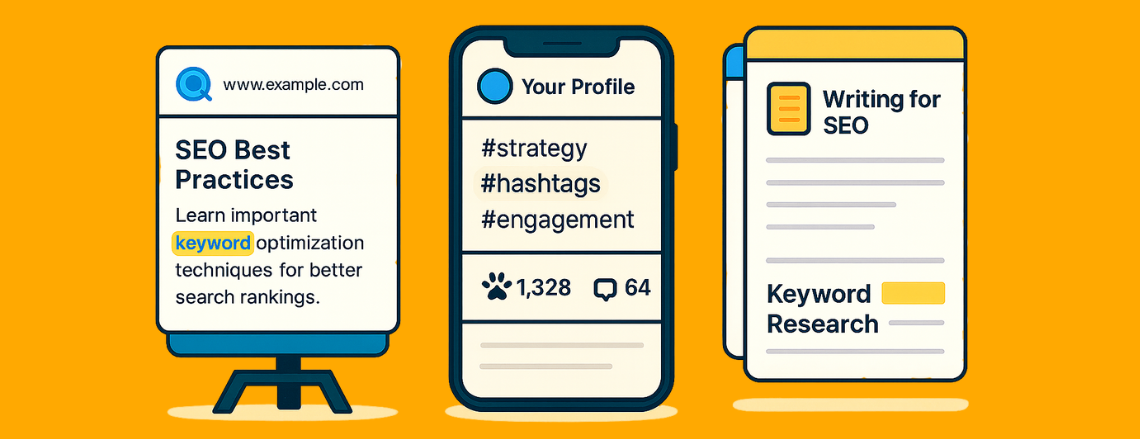
SEO doesn’t have to be intimidating. Whether it’s your website, social media, or blog, the goal is the same: make it easy for both people and search engines to find you.
This cheat sheet breaks down the essentials so you can start making minor tweaks that lead to big visibility wins.
If you’re new to digital marketing lingo, check out our Marketing Terms Glossary: A Beginner’s Guide for a quick refresher before diving in.
Website SEO Basics
Meta Descriptions
- Think of these as your website’s elevator pitch. They’re the short summaries that appear under your page title in Google results. A great meta description tells people what to expect and why they should click. Keep it under 160 characters and include your target keyword naturally.
Title Tags
- Your title tag is the clickable blue link in search results. It should include your primary keyword and a short, clear description of what the page is about; for example, “Real Estate Web Design | Stark Create.” It’s simple, readable, and tells both users and Google what you do.
Headings (H1, H2, H3)
- Headings give structure to your page. Your H1 should describe the main topic, while H2s and H3s break it into smaller sections. Search engines use this hierarchy to understand your content, and visitors use it to skim. A clean structure means happy readers and better rankings. Want a deeper breakdown? We explain exactly how to use headings for structure and readability in our article Blog Formatting Basics: How to Use H1, H2, and H3 for Readability and SEO.
Alt Text
- Alt text describes what’s in your images for both accessibility and SEO. Avoid keyword stuffing; just write what’s there (“German Shepherd sitting at a desk with laptop”) in a way that helps visually impaired users and gives Google more context.
Internal Linking
- Every link on your site is a pathway for visitors and search engines. Use links within your text to connect related pages, like linking your Services page from a blog post. It improves navigation, keeps people on your site longer, and helps search engines understand your content hierarchy.
Mobile Optimization
- More than half of web traffic likely comes from phones. If your site isn’t mobile-friendly, you’re losing visitors and SEO points. Make sure buttons are easy to tap, fonts are readable, and your layout adjusts naturally on smaller screens.
Page Speed
- A slow website is like a line out the door; people bounce. Compress images, avoid bulky plugins, and use tools like Google PageSpeed Insights to see where you can improve. Every second counts for SEO and user experience.
URL Structure
- Clean, descriptive URLs help search engines and humans understand your content. Instead of “starkcreate.com/blog?id=123,” go for “starkcreate.com/blog/seo-cheat-sheet.” Short, simple, and keyword-friendly always wins.
Secure Site (HTTPS)
- That tiny “s” in https:// actually matters. It means your website is secure, protected by an SSL certificate that keeps data safe between your site and your visitors. Without it, browsers will flag your site as “Not Secure,” which can send people running for the hills.
The fix? Most web hosts (like Bluehost, GoDaddy, or SiteGround) include free SSL certificates. Once installed, your site automatically switches from http:// to https://, showing a lock icon in the address bar. It’s a small change that builds trust, protects your visitors, and even gives you a little SEO boost in Google’s eyes.
Sitemap & Indexing
- Think of your sitemap as your website’s table of contents for Google. It’s a behind-the-scenes file (you can usually find it by adding /sitemap.xml to your domain) that lists every page you want search engines to find. Submitting your sitemap through Google Search Console helps ensure all your important pages, not just your homepage, get seen, crawled, and indexed correctly. Most SEO plugins like Yoast or Rank Math create this file automatically, so you just have to submit it once. With it, you’re basically telling Google, “Here’s everything on our site; come take a look!”
Social Media SEO
Optimize Your Bio
- Your bio is prime SEO real estate. Include your primary keyword (like “Real Estate Agent in Nashville” or “Custom Website Design Studio”) so people can find you faster. Keep it short, clear, and consistent with what’s on your website.
Use Keywords in Captions
- Yes, keywords belong in your captions too. Each post is a chance to tell platforms and search engines what you’re about. Mix natural keywords with personality so your content reads like a human wrote it, not a robot.
Consistent Links
- Every profile should lead to the same main destination — your website. Double-check that your URL and contact info match across all platforms. Consistency builds trust and helps with SEO indexing.
Hashtag Strategy
- Treat hashtags like mini search terms. Mix broad ones (#SmallBusiness, #DigitalMarketing) with niche or location-based ones (#NashvilleMarketing, #RestaurantWebDesign). It helps your posts reach the right crowd instead of getting lost in the noise.
Profile Photos & Handles
- Your username, handle, and profile picture should be consistent across platforms. The same logo and name help followers recognize you instantly and make your brand easier to find in searches.
Alt Text on Images
- Just like your website, social media platforms like Instagram and LinkedIn let you add alt text. Use it to describe what’s in the photo; it helps with accessibility and gives your post extra context for search engines.
Keyword-Rich File Names
- Before you upload that image, rename it something relevant like “stark-create-web-design-team.jpg” instead of “IMG_1234.” Minor detail, big difference. Search engines actually read those filenames.
Tag Strategically
- When you tag clients, partners, or locations, you’re expanding your reach and context. It signals to algorithms that your post connects to those entities and often leads to more eyes on your content.
Engage Consistently
- Algorithms reward activity. Reply to comments, interact with other accounts, and post regularly. Engagement tells platforms your profile is active and relevant, helping boost visibility over time. Curious how it all works? Check out How to Work With Social Media Algorithms — Not Against Them.
Keep Branding Aligned
- Your tone, visuals, and messaging should feel unified across every platform. That kind of consistency strengthens recognition and gives both humans and algorithms a clear understanding of who you are.
Blog & Content SEO
Choose the Right Keywords
- Start by researching what your audience is actually searching for. Use tools like Google’s Keyword Planner or even the “People Also Ask” section on Google. Choose one main keyword per post and sprinkle it naturally throughout — especially in the title, intro, and headings.
Focus on Readability
- Good content is easy to read and even easier to understand. Keep paragraphs short, use subheadings to break up text, and write like you’re having a conversation, not giving a lecture.
Write for People (and Google Will Follow)
- SEO used to be all about keywords; now it’s about helpful, people-first content. The more clearly your post answers a question or solves a problem, the better it’ll perform.
Create Evergreen Content
- Trendy topics are great, but evergreen content is what keeps traffic flowing year-round. Think “How-To” guides, FAQs, or topic explainers that stay relevant long after they’re published.
Cross-Link Your Content
- Every post should lead somewhere. Link to other related blogs, your services page, or your contact form. It keeps readers exploring your site and helps search engines understand how your content connects.
Add External Links (the Right Way)
- Citing credible sources, like industry studies or expert blogs, adds authority to your post. Just make sure links open in a new tab and are from reputable sites.
Optimize Your Images
- Every image in your post should have descriptive file names, like “stark-create-seo-blog.jpg,” and clear image descriptions that explain what’s shown. This not only helps with accessibility but also gives your post extra SEO juice.
Update Old Posts
- SEO isn’t “set it and forget it.” Revisit your older articles every few months to refresh outdated info, fix broken links, or add new internal links. Google loves fresh, active content.
Encourage Engagement
- End your post with a reason for readers to engage — a question, a comment prompt, or a CTA such as “Let’s Connect.” Engagement signals that people find your content valuable, which can help with visibility.
Structure for Search
- Search engines love clear organization. Use numbered lists, bullet points, and descriptive subheadings (like this article). The easier it is to skim, the more likely readers, and Google will stick around.
Our Final Thoughts
No matter where you’re showing up, the same SEO principles always apply: clear structure, consistent messaging, and helpful content. These are your major starting points for growth. When you focus on clarity, connection, and accessibility, visibility naturally follows. Good SEO isn’t about chasing trends; it’s about building trust and showing up with intention.
Have an SEO question that didn’t make the list? Let us know what SEO topics you want us to unpack next. We’re always here to make the complex feel clear!
